KitchenAid induction cooktop service manual

In preparation for a future post in which I do some failure analysis on my KitchenAid KICU509XBL induction cooktop, I dug up the service manual I had laying in one of my document drawers and have scanned it into a PDF. Download the PDF file here.

Since Googling for the cooktop’s error/failure codes didn’t turn up anything useful, I’ll post them here so that people can find it more easily (note that I’ve paraphrased it from what’s listed in the PDF itself):

Failure types:

  1. Power control board: Affects only one burner, with the rest remaining functional.
  2. Usually from the power control board, but could be some exceptions: Affects all burners associated with that control board, but any burners that aren’t using said board will still work.
  3. User interface board: Entire cooktop will be unusable.

Error codes:

  • F12: Type 1 – Insufficient current to a burner’s electromagnetic coil.
  • F21: Type 2 – Mains power supply frequency is out of range.
  • F25: Type 2 – Cooling fan is stuck or dead. The specific fan that has failed can be determined by which side the F25 error code is appearing on the user interface board.
  • F36, F37: Type 1 – A burner’s temperature sensor has failed.
  • F40: Type 1 or Type 2 – Power control board has failed.
  • F42: Type 2 – Mains power supply voltage has a problem, perhaps an open fuse on the EMI filter/mains input board.
  • F47: Type 2 – User interface board cannot communicate with the power control board, and/or its fuse is blown. (This failure code is what appeared on my particular cooktop.)
  • F56: Type 3 – The configuration data on the cooktop’s user interface board EEPROM is invalid.
  • F58: Type 2 – The configuration data on the cooktop’s power control board EEPROM is invalid.
  • F60: Type 3 – User interface board has failed.
  • F61: Type 2 – Power control board has failed, likely because it is not receiving enough voltage.
  • C81, C82: Type 2 – Cooktop is overheating.

EDIT (November 6, 2015): The F47 code, in my case, was because the power control board (which is responsible for driving the induction coils to heat up the cookware) had short-circuited somehow. Either way, it burnt out all of the transistors and the diode bridge, which then caused its fuse to blow, and at one point it tripped the main breaker in the house.

I suspect it was caused by using the largest element (the rear right burner) on the Boost/P setting, which overloaded the electronics and caused them to fail dramatically. After getting the board replaced (twice), KitchenAid said they do know about this issue to some extent, and repaired our cooktop free-of-charge despite being out of warranty for several months.
Mini-Ramble: Obligatory filler post

It’s been well over a month since my last post. Some upcoming posts are in progress but none of them are in a state that I’d want in order for them to be publishable.

Upcoming posts involve tearing apart yet another portable power pack, replacing laptop battery gauge chips and perhaps some other related posts if I get to documenting and photographing those works.

There’s no real ETA for these; work on this blog will resume once my depression decides to stop kicking me in the shins every day…

Ramble: Flappy Bird crash investigation

Although it’s already been pulled off the iOS App Store and the Google Play Store, I managed to get a copy of the .apk file and decided to play it on my phone. Seeing others’ experiences along with my own, I noticed there is a pattern to how the annoying little birds fly and crash.

Bird-control theory

The bird is controlled by tapping the screen, which causes the bird to move upward shortly before falling down again. Unlike other similar games, the screen needs to be periodically tapped to keep the bird in the air. This is basically pulse-density modulation at work; each tap of the screen causes a rise of a fixed amplitude and duration.

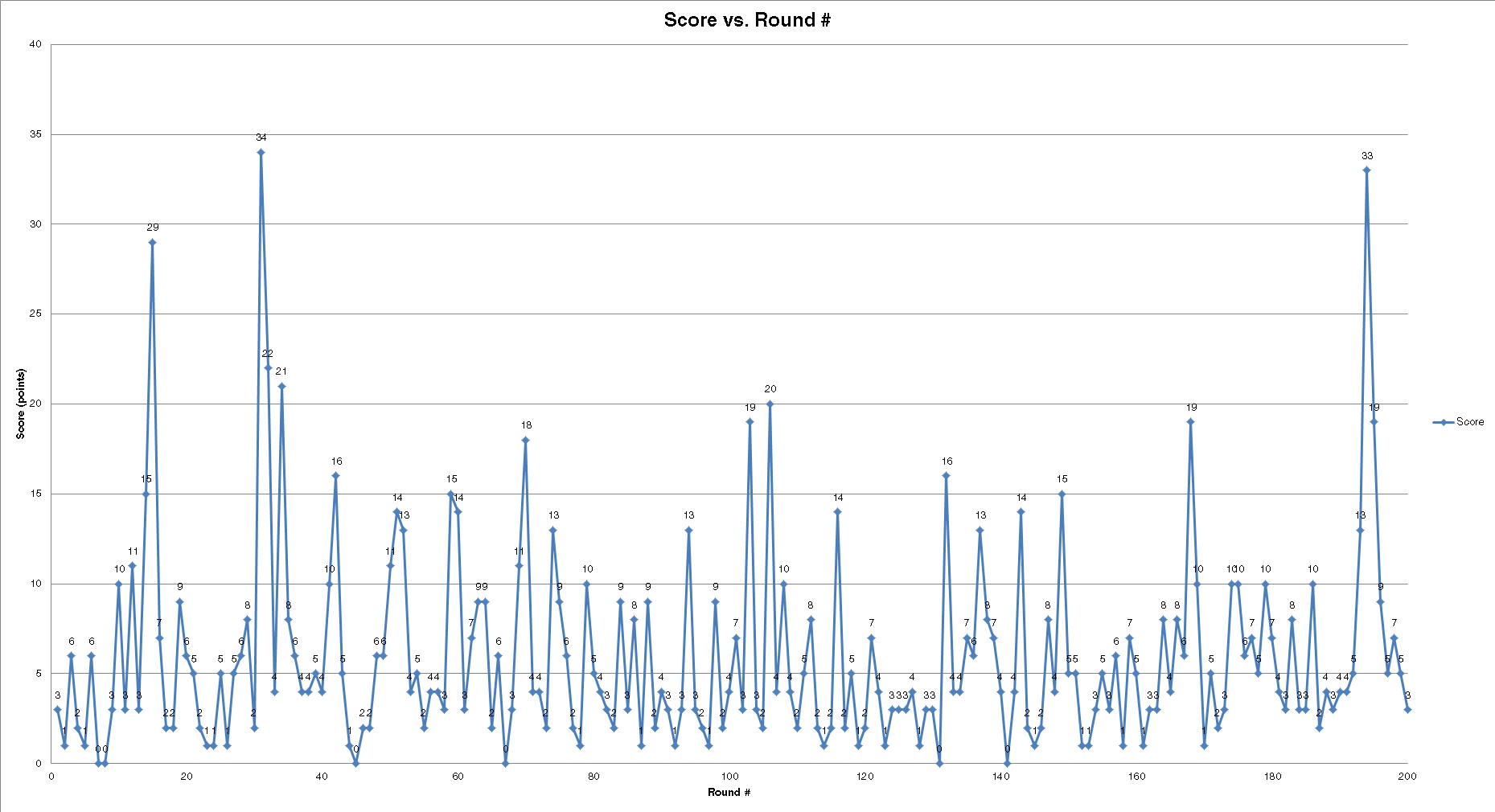
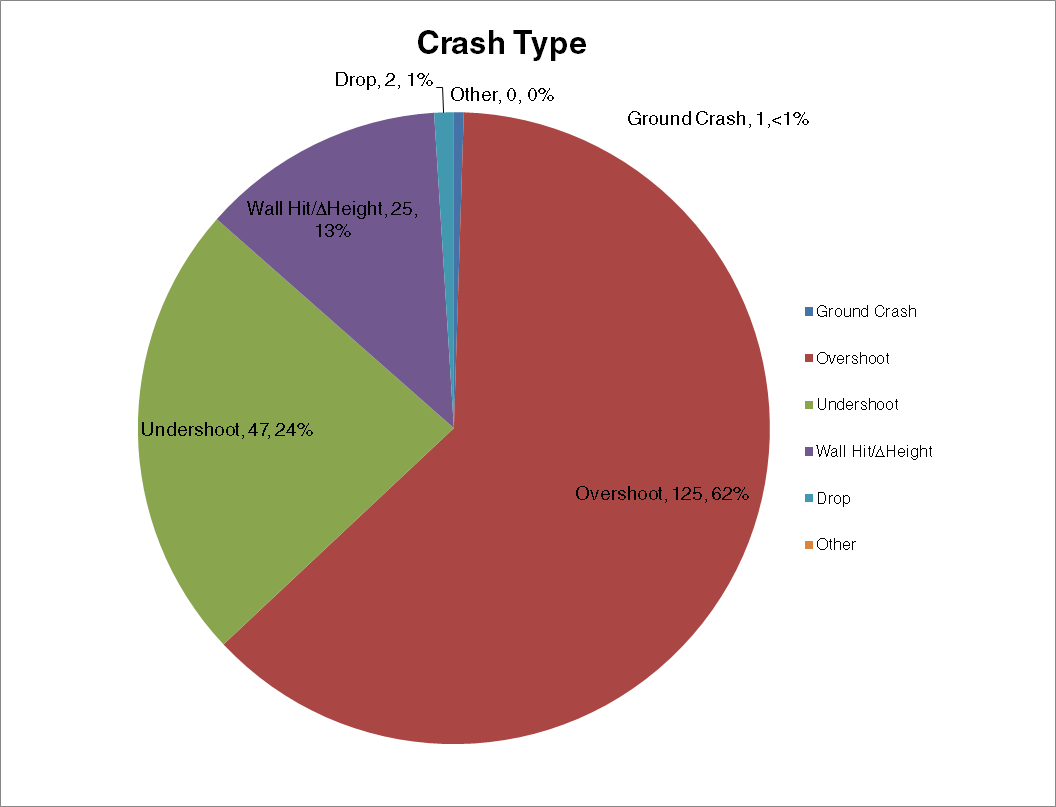
After playing over 200 rounds, I tabulated the data in a giant Excel spreadsheet, documenting the score along with how and where the bird crashed. With this data, I created a bunch of charts showing how and where crashes occur.

Charts

scorescrash typecrash locationscrash proximityBreakdown

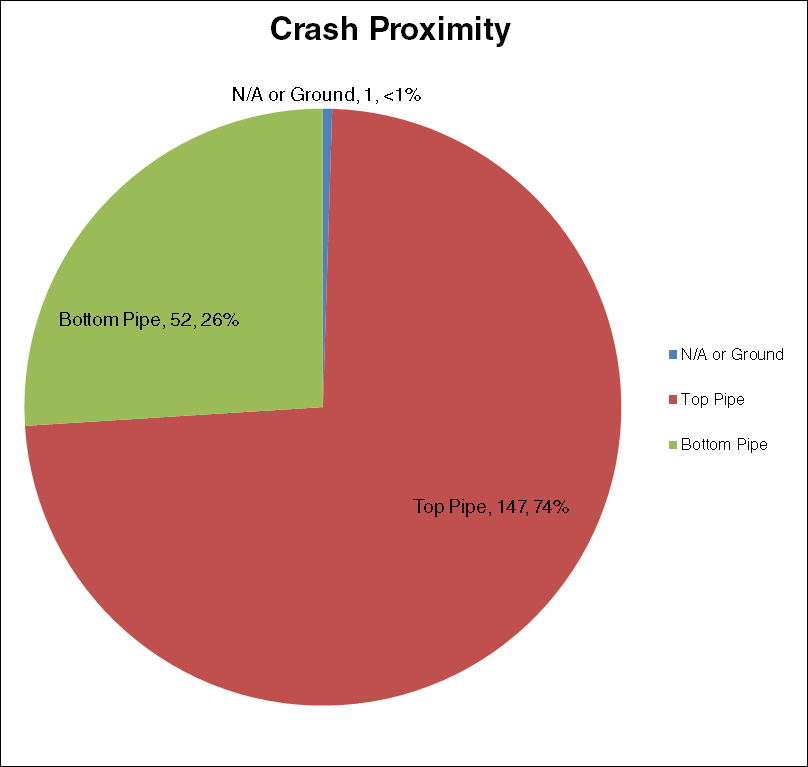
From what I’ve collected, the majority of crashes are overshoots (the bird flies too high and hits the pipe), hitting the top pipe either to the left side or in the center. This can be attributed to the bird’s behavior when flying. When the screen is tapped, the bird moves a certain distance upwards but cannot be controlled. If the bird is too close to the pipe, an overshoot will occur and crash the bird.

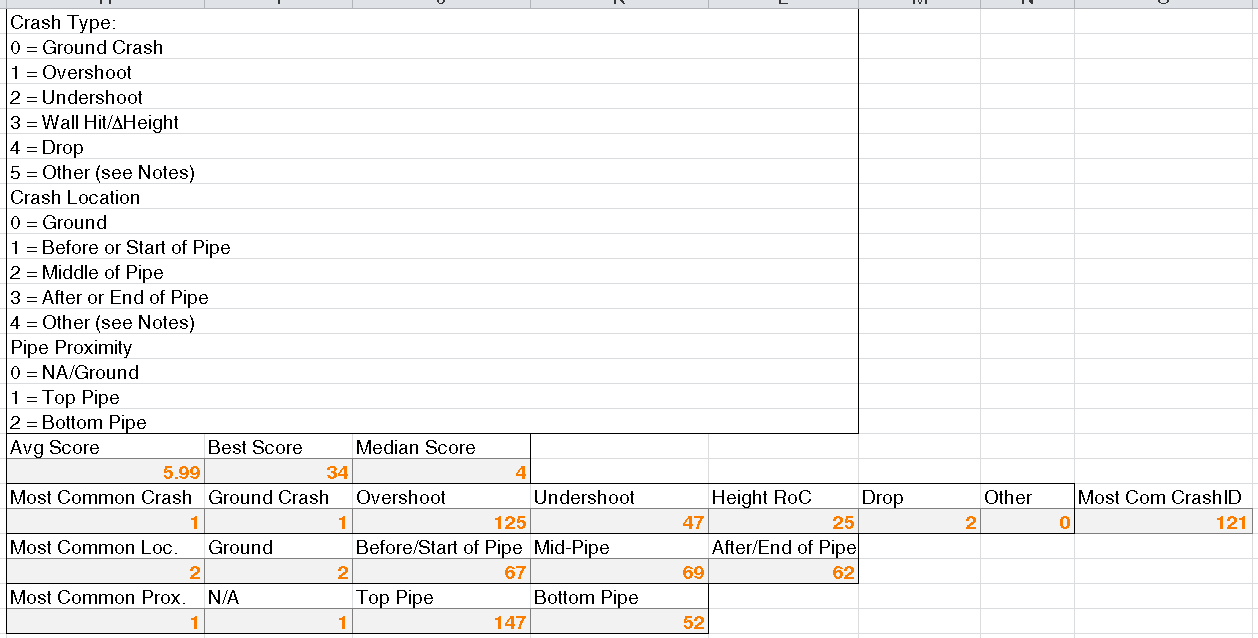
I created a bunch of statistics in the spreadsheet outlining the most common crash IDs (explained in the picture) and score information (my highest was 34 🙂 )

statsWas this a good way to cure boredom? Probably, but also possibly a bit too much work given the premise of this game.

If you want a copy of the Excel spreadsheet, click the link below.

Flappy Bird Crash Data

Mini-Ramble: I’m one of TI’s Community Members of the Month!

Yesterday I received a nice little email from The Texas Instruments E2E Community team. I was chosen as their Member of the Month of their analog electronics forum, specifically the battery fuel gauge section (of course!).

CaptureTI is sending me a Fuel Tank BoosterPack for their Launchpad microcontroller development platforms. It includes a 1200 mAh lithium-polymer battery, a bq27510 fuel gauge, and a bq24210 lithium-ion charger, all on one board. They’ve also offered me the opportunity to write a post on their power management blog, Fully Charged, regarding this little board. When I receive it I’ll definitely be taking a closer look at it.

Thanks, Texas Instruments!

Mini-Ramble: I’m such an icon artist!

After working so much with these battery chips, I thought I should spice up the Windows file icon for the .gg files that clutter my documents folder.

I’m not a person for glossy icons, but I’m also not a fan of the super-flat colour scheme that the Windows Metro UI uses. I prefer the good old style of Windows 9x-esque icons (hey, it’s what I grew up on! 🙂 ), albeit with a more… contemporary colour scheme. Keep it simple!

Windows .ico file download: https://www.dropbox.com/s/u7kjb3og7ecvpsj/gas%20gauge%20file.ico

You can use Nirsoft’s FileTypesMan to add an icon in Windows. Personally, I configured it so that .gg files open up in Notepad++ for manual editing.

Ramble: 1.5-volt lithium polymer AA battery? What sorcery is this?

Been a while since I’ve posted anything on here, but I decided to share my thoughts on a peculiar AA battery.

This AA battery is the Kentli lithium-polymer AA cell. It has a built-in 1.5 volt regulator that converts the typical 3.7 volts down to 1.5 volts (open-circuit at least). I bought a 4-pack of these cells from AliExpress back in October, but have yet to receive them. Even though I haven’t gotten them, there is some things that I’ve taken note of.

Current/voltage output

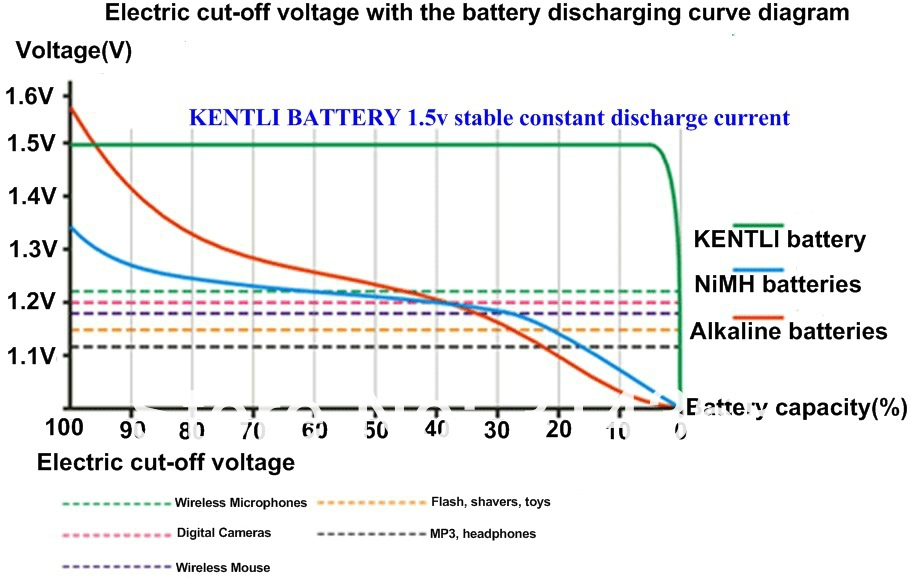
A graph promoting the battery discharge curve of the Kentli cell is shown below, taken from a sales page on AliExpress (rehosted on this blog to prevent image bandwidth-hogging):

705255222_102The interesting thing I found out was the green dashed line. This is supposed to represent the output voltage when used in a wireless microphone. However, the graph itself provides no meaningful data because no current loads are specified at all. In an attempt to get some sort of information from the graph, a Google search for a spec sheet for a typical microphone gives a discharge current of 125 mA. But a 0.3 volt drop at 125 mA? I dunno, this doesn’t seem right.

Safety

From a safety point of view, I’m not sure about how much temperature would rise in the cell from high current draw and whether overheating could occur in use, and if any typical Li-Ion protection circuitry is used (voltage and discharge protection). Given how this is made by some relatively unknown Chinese company, who knows.

I’m not saying anything definite until I see these cells and have a chance to get my paws on them for testing and disassembly. Until then, we’ll just have to wait.

Ramble: AC Power DoS attacks via a GFCI tester

GFCI (ground fault circuit interrupters) are the rarely-recognized heroes of the electrical world. They can protect a person who is unlucky enough to end up between the AC line and ground, and, if working correctly, are a life-saving invention used in almost every home, commercial and industrial building out there.

2013-08-22_21.59.39[1]

Although GFCIs come with a built-in test feature, AC outlet testers are available that simulate a true fault condition; that is, it actually induces a ground leakage to verify that the GFCI circuit actually works. However, I was thinking that, if used maliciously, these tools can be used to disrupt power circuits that are protected via a remote GFCI breaker; for example, outdoor power outlets on a building which generally are wired 2 to 5 per breaker.
If the breaker trips, then someone will have to go to the breaker room and manually switch the circuit back on, which can definitely cause headaches for anyone who needed to use that circuit.

The effects of this aren’t that dire. One can’t take out a whole building’s power infrastructure this way and the worst that happens will be some downtime until maintenance comes out to restore power. Still, that doesn’t mean some prankster would do this just to have a laugh at anyone who needed to use that power outlet later.

Ramble: Consumer external batteries that have firmware updates and SCADA? I don’t get it!

I’m looking at  XPAL Power’s website, where they advertise that their batteries can:

  • check battery manufacture date
  • remotely report charge cycle count, and remaining cycle count before wear-out
  • perform a battery calibration via a charge-discharge cycle
  • remotely monitor and report battery temperature
  • perform battery firmware resets and updates

Some of these features are definitely feasible, some others… well, I have a very hard time trying to believe some of these.

  • Manufacture date check: Definitely doable. Any decent manufacturer would keep records of serial numbers and correlate it to manufacture date, lot codes and so on.
  • Remote cycle count and SoH (state of health) reporting: I honestly cannot see how this would be feasible without either a USB cable or some other means of data transfer. Bluetooth may be an option but that brings issues of its own (you’d need a BT transceiver in the battery, which I strongly doubt exists in a consumer external battery). However, the idea of cycle count and health monitoring isn’t anything unusual; as mentioned in previous posts, modern gas gauges are definitely capable of counting charge cycles and other battery health parameters.
  • Battery calibration: If the battery has a (at least moderately) smart gas gauge IC, then this would be done for calibration anyway; nothing novel here.
  • Remote temperature monitoring and reporting: This would fall under my statement about SoH reporting and so on. Additionally, the whole idea of continuous reporting of temperature to the user (and the manufacturer) would require some sort of network connection, whether it be wireless or wired. Either way, this would mean that a prohibitively expensive solution would be needed to implement what is essentially SCADA (supervisory control and data acquisition)… in an external battery used to charge a phone, tablet or laptop. But, if this feature is used then I guess there could be a way to use the device’s network connection (maybe USB-to-serial or something) to communicate with the manufacturer to transfer data. Once again, this would bring problems with device compatibility, and I strongly doubt that a USB charger would implement a microcontroller system that has enough oomph to implement USB host functionality just to send battery data.
  • Remote firmware control:  I don’t see how this would be implemented outside a laptop battery that uses the Smart Battery System to communicate. Even if a battery had a microcontroller (most out there would have basic protection, charging and DC-DC conversion), I doubt that a means of programming would be exposed to an external data port. What if  a communication problem caused the firmware update to abort prematurely?

I don’t mean to bash XPAL or anything (I have many of their products and their batteries have outlasted any other Li-Ion based devices I have had) but I’m just not sold on how they can implement remote reporting and firmware updates  for their batteries, given the amount of processing required host- and battery-side to implement these functions. Even if it was a fully remote and wireless solution, then it’d require RF interfacing which would cost far too much to implement in a way that would require nearly zero user intervention.

That said, I myself have plans to implement something like this (a battery with a BT interface) but it definitely isn’t something that would be feasible for the mass market. That will be revealed in a later post, but in the meantime I’m mourning the loss of a very nice 4-cell battery that I built that used my bq27421 chip to do charge gauging.

Convenient chips but even more inconvenient packages – Fail, fail, fail and fail again: Trying to solder the TPA2011D1 speaker amplifier

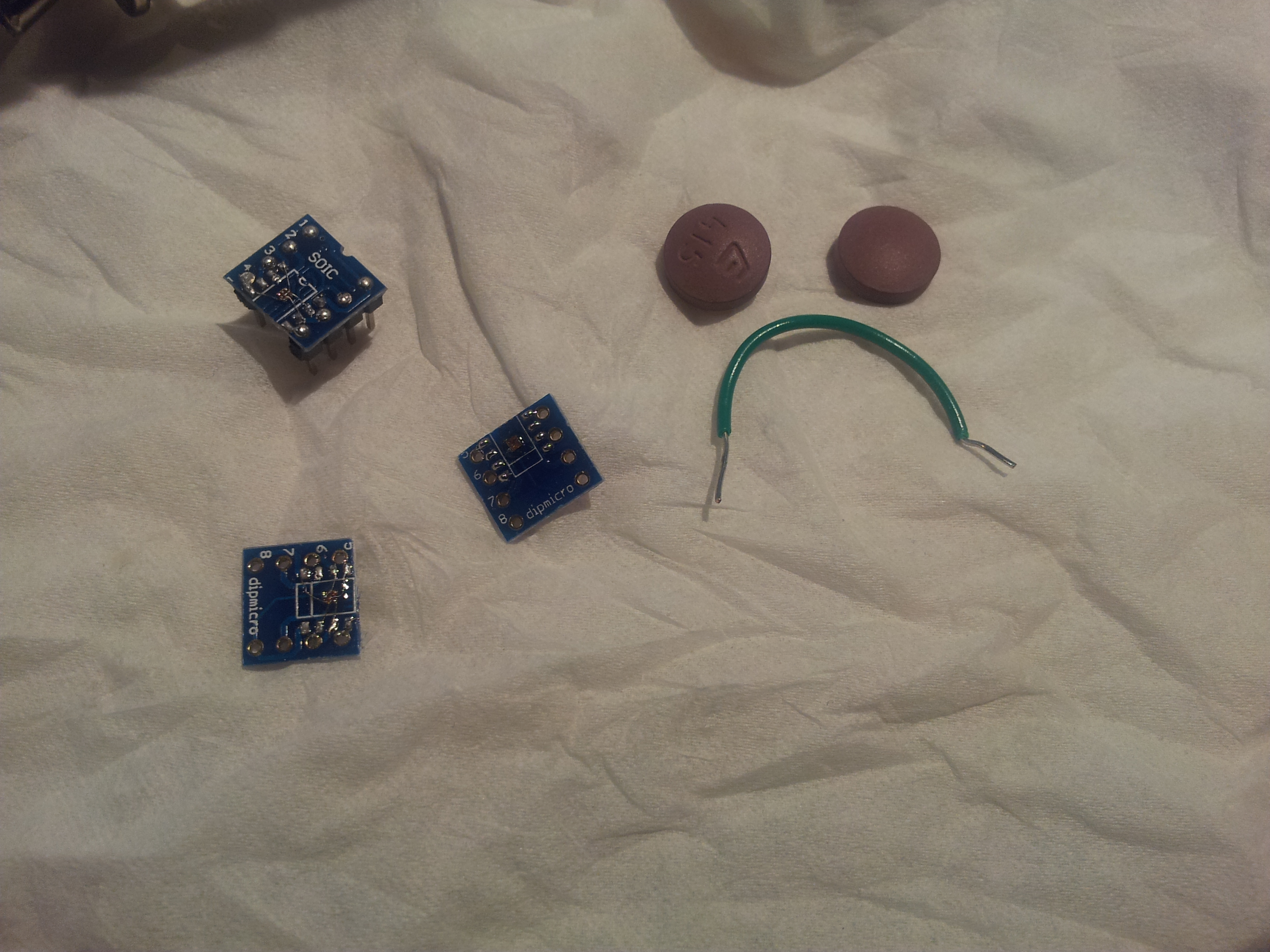
I was doing some prototyping of the TI TPA2011D1 3 watt Class-D amplifier that’s in a 1.2 x 1.2 mm 9-ball BGA package. Unlike my tries with the bq27421, these chips are downright painful to solder. Out of 5 chips that I’ve tried to solder, only one of them actually worked. That’s a 20% success rate. Bummer. The only thing that’s preventing me from being any more angry about these chips is that my back and shoulders hurt quite a bit after hunching over to try and solder these bastards for a good 6 hours.

“Thumbs down!” –Dave Jones

2013-07-25 01.35.11

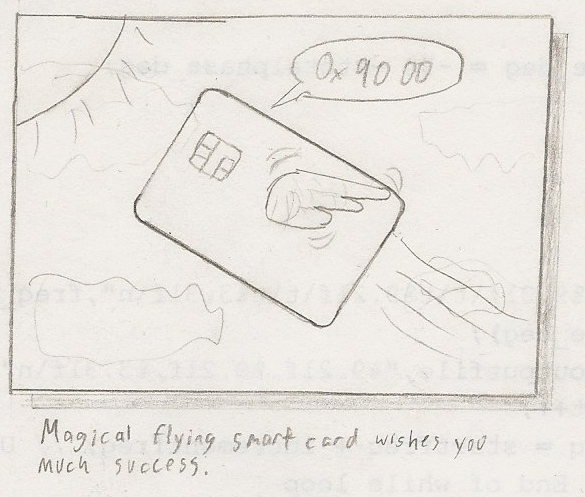
Mini-Ramble: Magical flying smart card wishes you much success

magical flying smart card

Drew this during the end of my C programming final exam. If you know me in real life, you’ll know that I’m all about smart cards, little pieces of plastic with a processor inside of them. Also, 0x90 00 merely means “success” in smart-card language, hence the little tagline under the drawing.

First of the Year

Whoa, turns out I had this blog lying dormant for a good 10 months!

I’m Jason, this is my tech hack-mod-make style of blog, along the lines of nearly every other hack-mod-make style of blog. I’ll be posting occasional posts, pictures and maybe a few ramblings here and there.